
Websites & UX
What a modern digital presentation of a real estate project can look like
How to combine premium visuals, interactive apartment selection, live availability and a simple sales process on a modern real estate project website.
Contents
When selling property, location, layout and price aren’t the only deciding factors.
The way the project is presented plays a big role too.
Potential buyers often see the website before they contact a sales agent, visit the sales office or see the location in person. That makes the website the first impression of the entire project.
If the site feels outdated, confusing or doesn’t provide enough information, it can lower the perceived value of even a high-quality development.
A modern real estate website shouldn’t work as just an online brochure.
It should let visitors understand the project, discover its atmosphere, explore the available units and naturally move on to a specific inquiry.
A real estate project website isn’t just a list of apartments
Many development websites are built very simply.
They contain:
- a basic project description,
- a few visualizations,
- the location,
- a table of apartments,
- a contact form.
This information is necessary, but on its own it may not create a compelling experience.
Visitors aren’t just buying a certain number of square metres.
They imagine what it will be like to live in the project, what views they’ll have, where they’ll go for their morning coffee, where they’ll park and how they’ll feel when they come home.
A digital presentation should therefore combine two levels.
The first is the emotion and atmosphere of the project.
The second is the concrete information needed to make a decision.
If a website offers only emotion without details, users won’t get answers.
If it offers only tables and technical data, the project may come across as an ordinary property catalogue.
The best solution combines both.
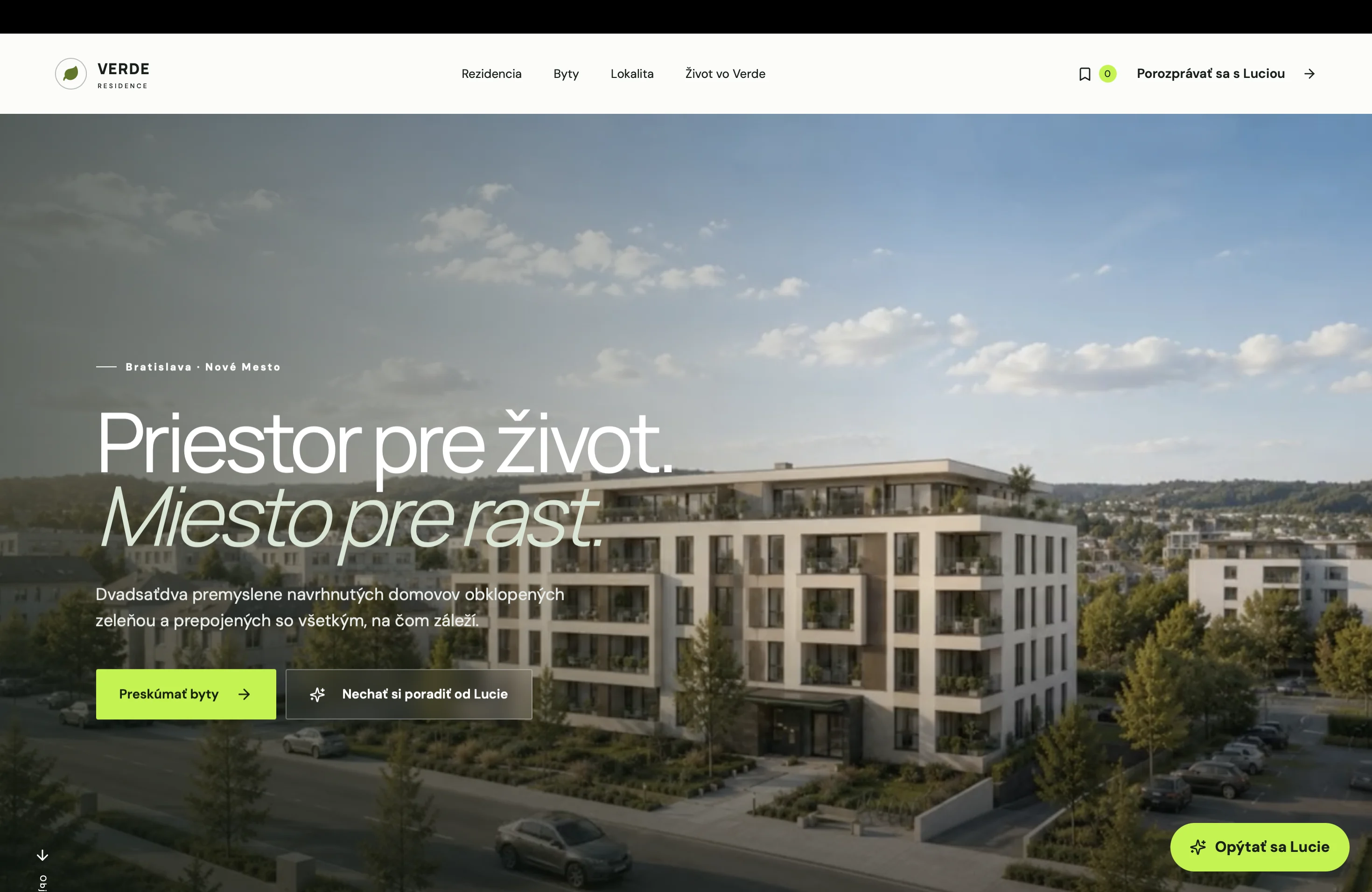
The first seconds have to create the right impression
The opening section of the website should immediately communicate the character of the project.
An urban residence in the city centre is presented differently from a quiet project close to nature.
The hero section can include:
- an architectural visualization,
- a short cinematic video,
- a transition between exterior and interior,
- a view of the location,
- a clear main headline,
- information on availability,
- a call to choose a unit.
It’s important that the intro isn’t just visually impressive.
Visitors need to understand quickly:
- what the project is,
- where it is,
- what it offers,
- who it’s for,
- where to go next.
A generic slogan without context may look premium, but it may not explain anything.
The headline should connect the project’s identity with its main advantage.
For example:
“Modern living in a quiet part of Košice.”
Or:
“City living a few minutes from the centre of Bratislava.”
The headline can be followed by a short note about the number of apartments, the completion date or the current sales phase.
The project needs its own story
A good presentation shouldn’t start with just a technical description of the building.
It should explain why the project was created and what it offers future residents.
The story can be built on:
- the connection of city and nature,
- quiet family living,
- premium architecture,
- access to services,
- community spaces,
- investment potential,
- views,
- the historic character of the location.
The copy has to stay concrete.
Phrases like “living that changes the future” or “a new dimension of life” sound grand but give visitors no real information.
It’s stronger to name a real benefit.
For example:
“Quiet car-free courtyards, a playground and services right in the project.”
A sentence like this helps visitors picture everyday life.
Visualizations have to work as part of the story
Architectural visualizations are among the most important sales materials of a development project.
On many websites, though, they’re just dropped into a classic gallery.
A modern presentation can use them much more effectively.
Visualizations can be part of the entire user journey.
For example:
- the exterior introduces the architecture,
- a detail of the entrance shows the materials,
- the courtyard presents the community space,
- the interior illustrates the standard,
- the balcony shows the view,
- an evening shot creates atmosphere.
Every visual should have a clear purpose.
There’s no need to show twenty similar views of the same building. It’s better to choose fewer strong shots that gradually explain the whole project.
The quality of animation matters too.
If static visualizations are turned into video with AI, the motion has to feel natural. Artificial movement of people, shifting building geometry or distorted details can undermine the project’s credibility.
For a premium development, the digital presentation has to match the quality of the architecture itself.
Video can create an experience an image can’t
A short cinematic video can help visitors feel the atmosphere of the project.
It can show:
- arriving in the area,
- moving through the exterior,
- entering the building,
- stepping into an apartment,
- the view from the terrace,
- changing daylight,
- life in the courtyard.
However, video mustn’t block access to information.
Users shouldn’t have to wait through a long intro they can’t skip.
A good solution uses video as a visual layer while keeping:
- a readable headline,
- a clear button,
- fast loading,
- playback controls,
- mobile optimization,
- support for reduced motion.
Not every visitor has a fast connection or wants to watch animations.
That’s why a high-quality static alternative has to be available.
Interactive apartment selection
One of the most useful elements of a real estate website is interactive unit selection.
Users don’t have to scroll through a large table.
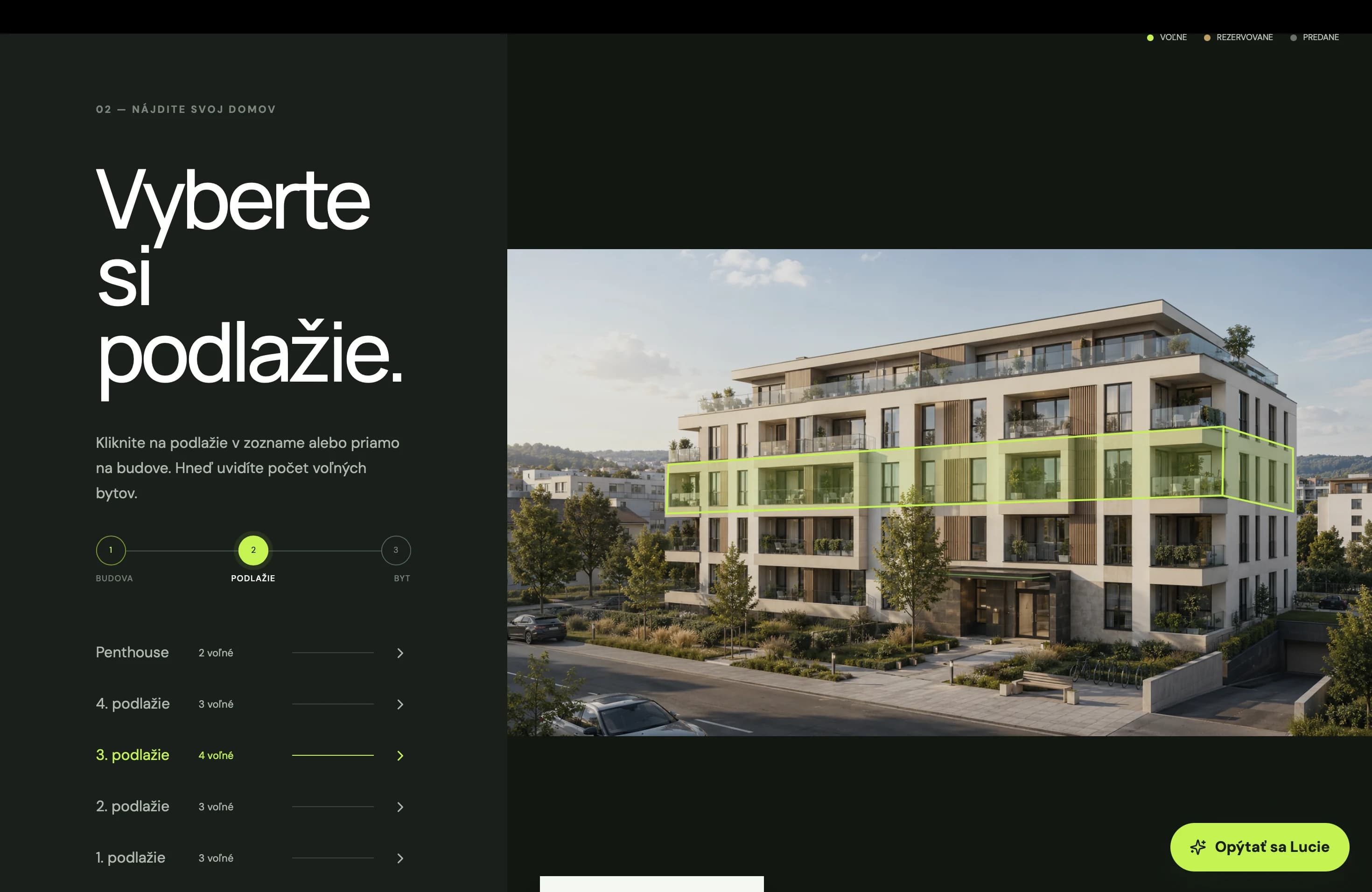
They can move visually through:
- choosing a building,
- choosing a floor,
- choosing an apartment,
- the unit detail.
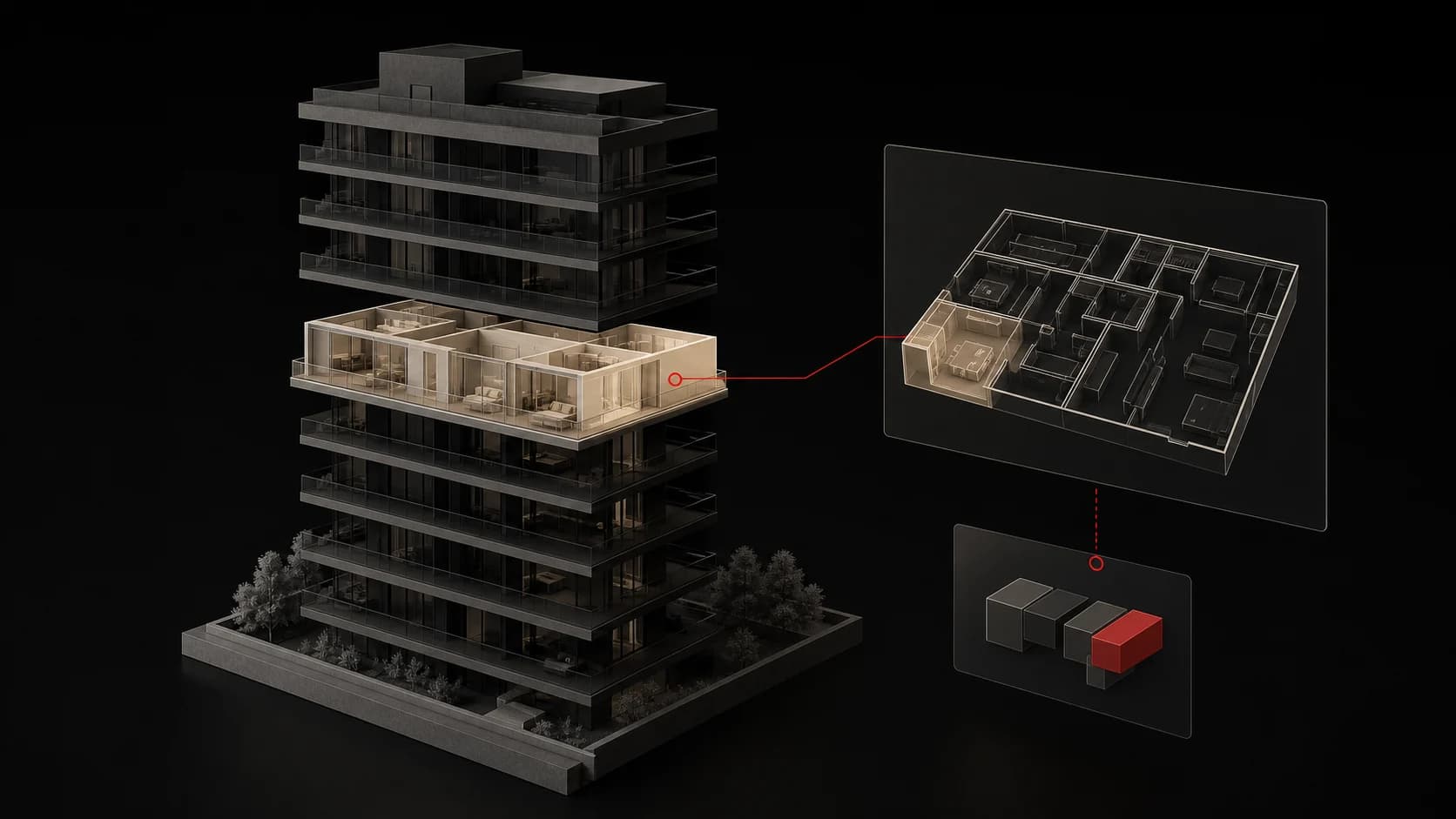
Individual floors can be highlighted on the building on hover or tap.
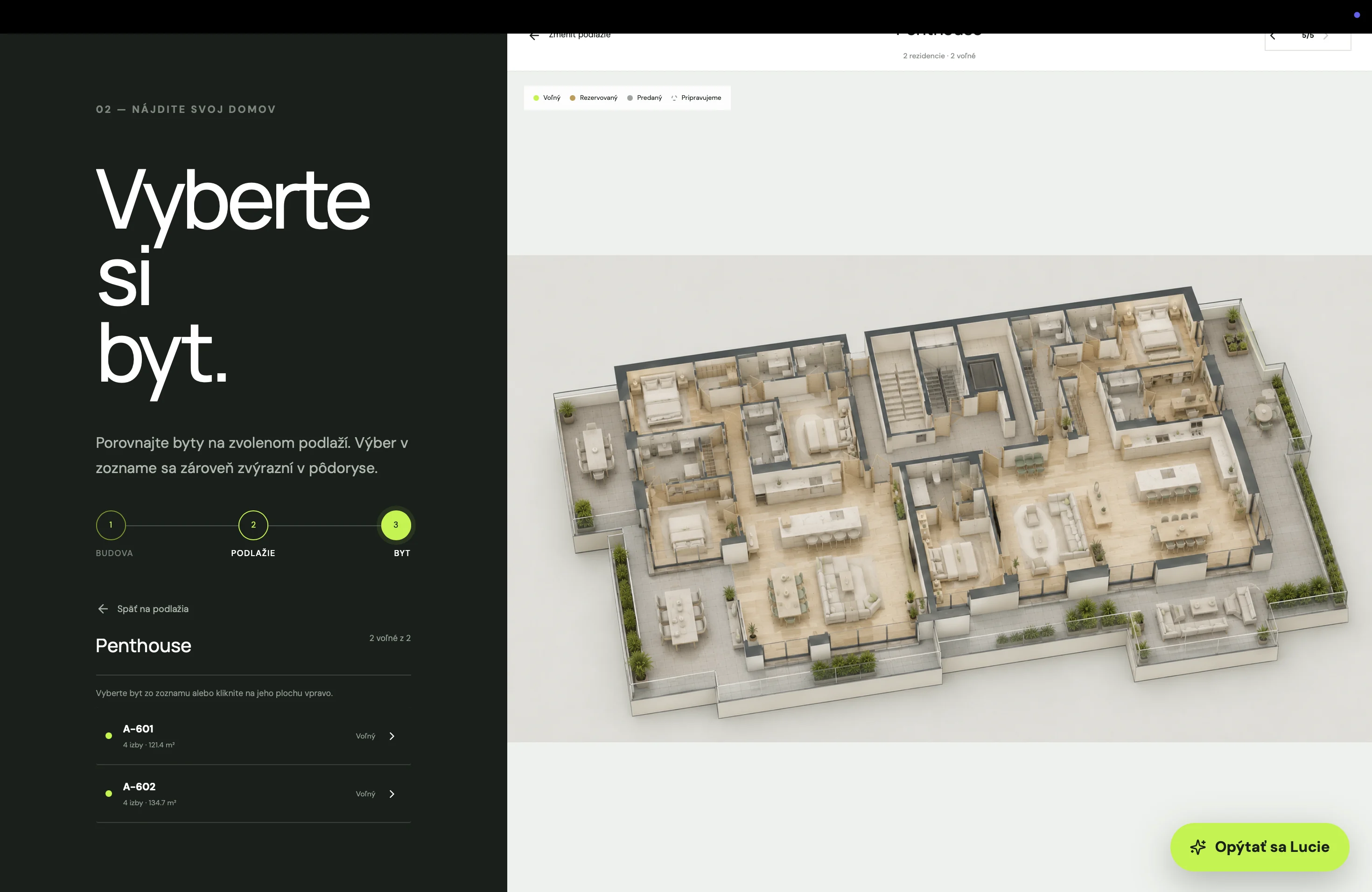
Once a floor is selected, a floor plan with available apartments appears.
Users instantly see where a particular unit is located.
Interactive selection can show:
- the apartment number,
- the number of rooms,
- the floor,
- the interior area,
- the balcony or terrace area,
- orientation,
- price,
- availability status.
A system like this feels more natural to users than a long list of unit codes without visual context.
The apartment table still has its place
An interactive building shouldn’t completely replace a classic list.
Some users want to quickly compare several apartments by price, size or number of rooms.
That’s why it’s worth offering a table view with filters too.
Users can filter by:
- number of rooms,
- price,
- floor area,
- floor,
- orientation,
- availability,
- balcony or terrace.
The table has to work well on mobile too.
Wide horizontal tables are a problem on smaller screens. Separate cards or showing only the most important details with an option to open the full detail can work better.
The interactive building and the table complement each other.
One supports visual selection, the other efficient comparison.
The apartment detail has to answer every important question
Every unit needs its own detail page.
It shouldn’t contain just a floor plan and a contact button.
Users need to see:
- the apartment code,
- the number of rooms,
- the floor,
- total area,
- interior area,
- outdoor area,
- orientation,
- price,
- monthly costs, if available,
- availability status,
- completion date.
The floor plan is an important part.
It should be large enough, readable and available to download.
It’s also worth adding:
- the apartment’s position on the floor,
- its location within the building,
- the view or orientation,
- an interior visualization,
- a list of specifications,
- a form linked to that specific apartment.
When a user sends an inquiry, the sales team has to know exactly which unit they’re interested in.
Availability must always be up to date
The status of apartments changes constantly during sales.
A unit can be:
- available,
- reserved,
- sold,
- temporarily on hold.
If a website shows outdated information, visitors may lose trust.
Imagine a user spends time choosing an apartment only to find out it was sold several weeks ago.
An experience like that can damage the whole project.
Availability should therefore be managed from one central system.
The website can be connected to:
- an internal database,
- a CRM system,
- a sales system,
- an admin interface.
The sales agent updates the status in one place and the change automatically appears on the website.
For a larger project, this kind of integration is far more practical than updating individual pages by hand.
Interior configurator
In some projects, buyers can choose from several interior specification packages.
The website can include a simple visual configurator in which users compare:
- flooring,
- wall tiles,
- floor tiles,
- interior doors,
- bathroom fixtures,
- colours,
- kitchen finishes.
The configurator doesn’t always have to change the whole apartment in 3D.
It can work with prepared interior visualizations that change depending on the selected package.
Users better understand the difference between specifications.
They can also see whether a particular finish is included in the price or comes at an extra cost.
An element like this can increase the perceived value of the project and help buyers form a more emotional connection to a specific apartment.
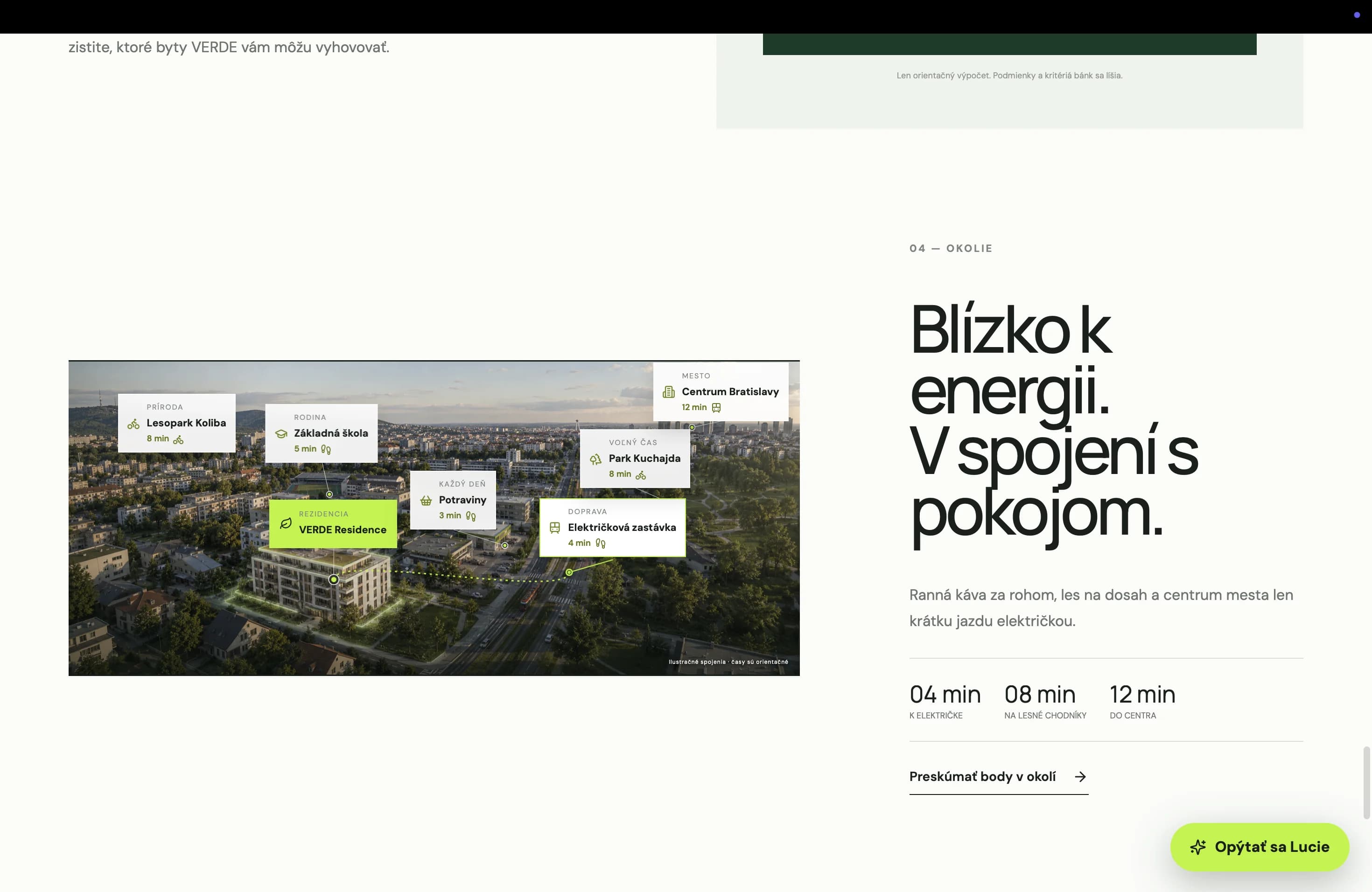
The location has to be presented practically
“Excellent local amenities” isn’t enough.
Visitors need specific information.
The location section can include an interactive map with points such as:
- schools,
- nurseries,
- grocery stores,
- restaurants,
- hospitals,
- sports facilities,
- parks,
- public transport stops,
- shopping centres.
Each point can show the distance or travel time.
For example:
- city centre within 10 minutes,
- school 5 minutes on foot,
- bus stop 300 metres away,
- park 8 minutes by bike.
Users don’t have to open another map and look everything up themselves.
It’s important to present the location truthfully.
When travel times are communicated, it must be clear whether they refer to walking, driving or public transport.
Architecture and materials
A premium project should also explain its architectural value.
Visitors may want to know:
- who designed the project,
- what the main concept was,
- which materials are used,
- how energy efficiency is handled,
- how parking works,
- what the shared spaces are,
- which technologies the project includes.
This information helps set the project apart from competitors.
It shouldn’t be buried in a long technical document.
The website can present it through:
- short blocks of text,
- detailed visualizations,
- simple diagrams,
- icons,
- a video with the architect,
- a comparison of specifications.
Users then get a clearer idea of what’s included in the price and why the project reaches a certain level of quality.
Project timeline
Buyers need to know what stage the project is at.
The website can include a simple timeline:
- start of construction,
- completion of the structure,
- completion of interiors,
- occupancy approval,
- handover of apartments.
The current phase can be visually highlighted.
During construction, the section can be updated with photos and short news.
This increases transparency and shows that the project is actually progressing.
For a larger project, a separate construction news section can be useful.
But the content has to be updated regularly.
A latest update that’s several months old can have the opposite effect and raise questions about the state of the project.
Financing and a mortgage calculator
The price of the property is only one part of the decision.
Customers often need to know what their monthly financing could look like.
A simple mortgage calculator can work with:
- the apartment price,
- the amount of own funds,
- the loan term,
- the interest rate.
The result can be an indicative monthly payment.
For investment properties, the website can also include a basic yield estimate.
Users can enter:
- the property price,
- the expected rent,
- operating costs,
- the amount financed.
The calculator mustn’t create the impression of a binding financial offer.
It has to be clearly stated that it’s an indicative calculation and that specific terms depend on the bank or financial partner.
Content for different types of buyers
Not every visitor is looking for the same thing.
A project may appeal to:
- young couples,
- families,
- investors,
- first-time buyers,
- international clients,
- buyers interested in premium property.
The website doesn’t have to create a completely different page for each group.
But it can offer relevant entry points.
An investor may want to see:
- potential yield,
- expected rent,
- growth of the area,
- rental management.
A family may care more about:
- schools,
- safety,
- a playground,
- layouts,
- storage space.
Users should easily find the information that matters for their own decision.
The contact process has to be simple
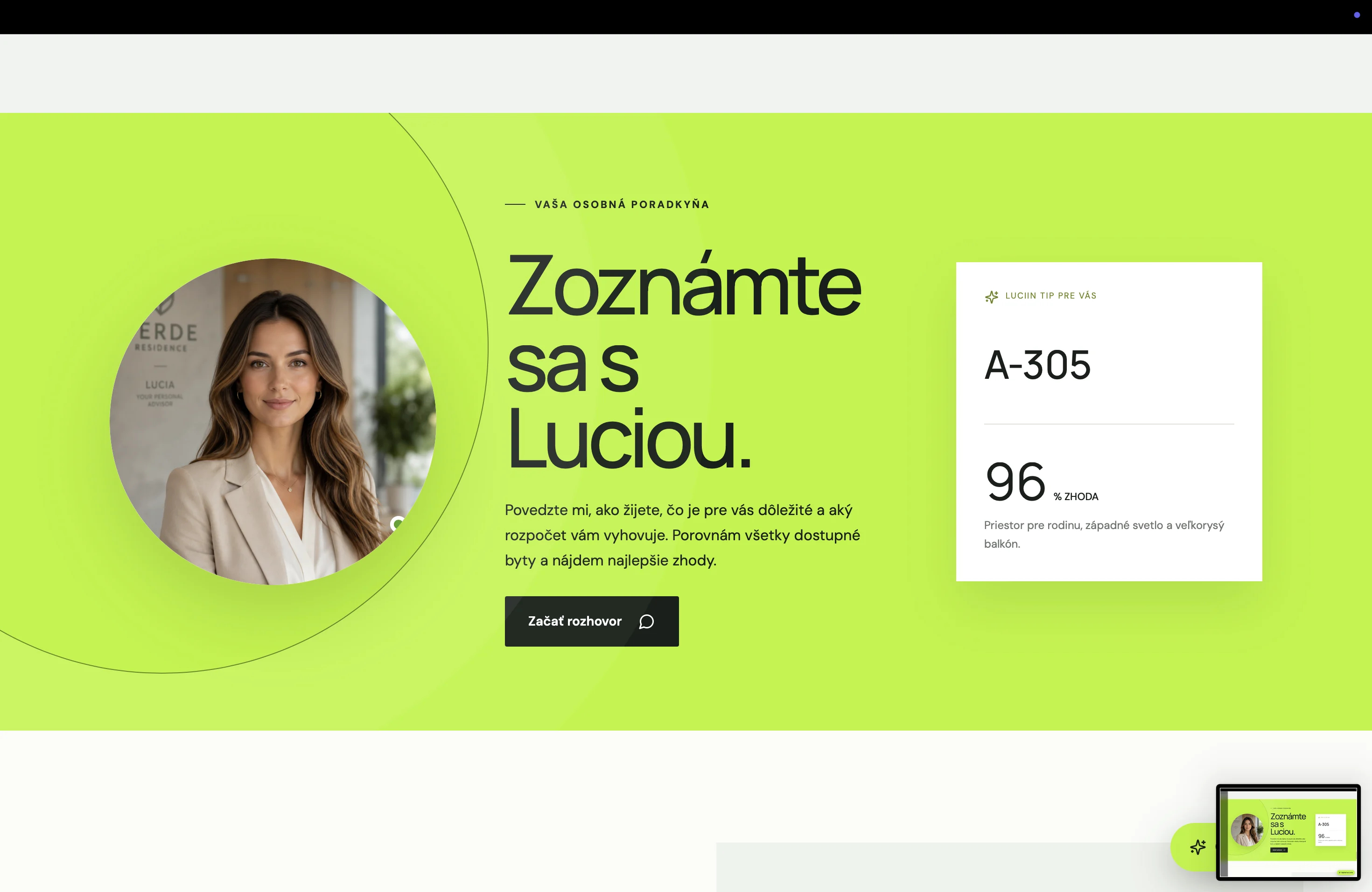
After browsing the project, visitors must clearly know how to continue.
They may want to:
- request a quote,
- reserve a specific apartment,
- arrange a meeting,
- visit a show apartment,
- download a brochure,
- request a call.
The call to action should be specific.
Instead of a generic “Contact us”, the website can use:
- Book a viewing
- I’m interested in this apartment
- Get the full price list
- Book a consultation
- Check availability
The form shouldn’t ask users for unnecessary details.
For an inquiry about a specific apartment, it’s enough for the system to attach its code automatically and for the user to add their contact details.
After submitting, they need a clear confirmation.
It should say when the sales team will get in touch and what will happen next.
The website has to work perfectly on mobile
Many prospects may discover the project for the first time through ads or social media.
The website therefore has to open on mobile without any limitations.
On a mobile device, it must be easy to:
- browse visualizations,
- filter apartments,
- open a floor plan,
- read prices,
- use the interactive building,
- send an inquiry,
- call the sales agent.
Complex 3D elements may not work the same way as on a computer.
The mobile version can use a simpler way of selecting units, as long as it keeps the same information and features.
It’s important that the design doesn’t put visual effects ahead of usability.
Small buttons, unreadable text and complicated gestures can lead to lost inquiries.
Speed and technical quality
Real estate websites often work with large photos, videos, maps and 3D models.
Without optimization, the page can take too long to load.
That’s especially a problem on mobile connections.
The website should use:
- the right image formats,
- multiple sizes per device,
- progressive content loading,
- optimized videos,
- compressed 3D models,
- loading demanding elements only when the user needs them.
The initial content has to be available as quickly as possible.
Users shouldn’t have to wait for the entire interactive building to load just to learn the project’s name and location.
Speed is part of both the user experience and the brand’s credibility.
Accessibility of a real estate website
A modern presentation has to be usable by as many people as possible.
The website should have:
- sufficient contrast,
- readable type,
- alternative text for images,
- keyboard navigation,
- visible focus states,
- descriptions of interactive elements,
- large enough buttons,
- captions or transcripts for videos,
- an option to reduce animations.
Important information mustn’t be available only in interactive graphics.
If users can’t operate the 3D building, they must be able to reach the available apartments through a classic list too.
If an apartment’s status is marked by colour, it must also have a text label.
Accessibility isn’t just a technical requirement.
It improves the overall clarity and usability of the website.
The sales team needs content management
After launch, the project will keep evolving.
Things that will change include:
- available apartments,
- prices,
- documents,
- construction status,
- contact persons,
- news,
- visualizations.
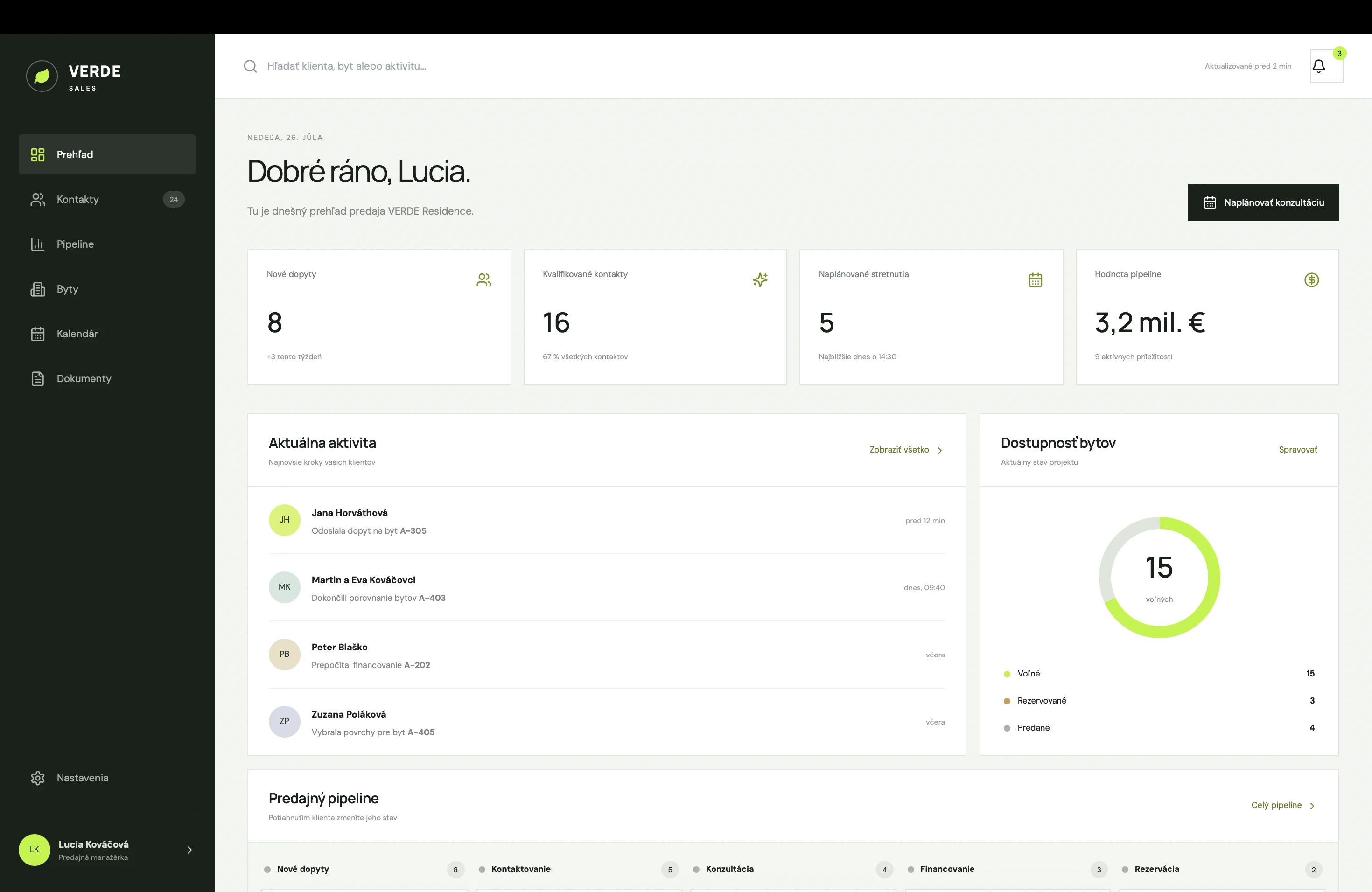
The sales or marketing team should therefore have a simple admin panel.
It shouldn’t depend on a developer for every price change or reservation.
The admin panel can allow the team to:
- change unit status,
- edit prices,
- upload floor plans,
- add news,
- change contacts,
- export inquiries,
- track interest in individual apartments.
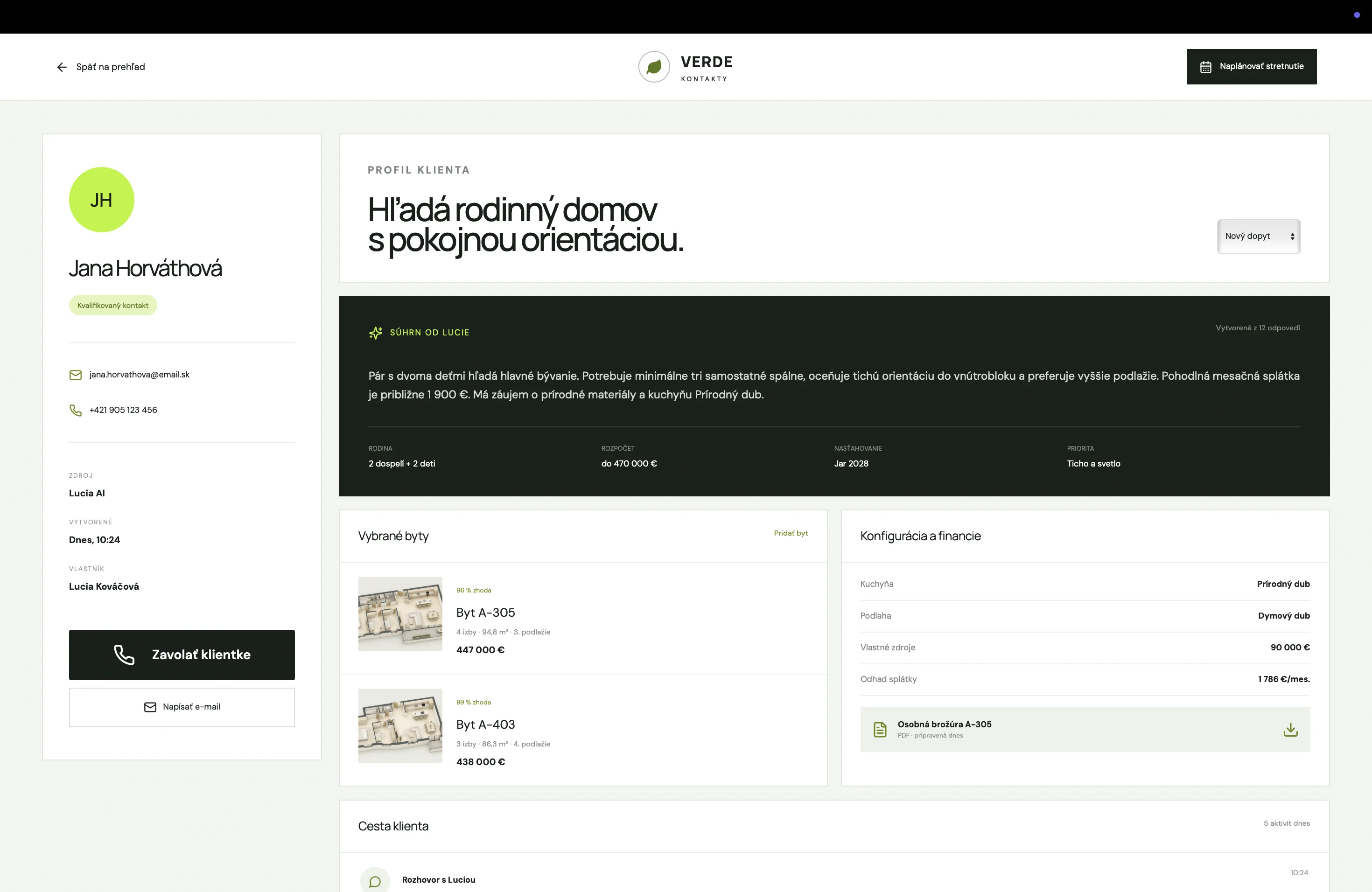
For a larger project, the website can be connected to its own CRM system.
Every inquiry is saved against a specific unit, and the salesperson sees the entire communication history.
Data shows what prospects are really looking for
A modern real estate website can collect anonymous data on visitor behaviour.
The developer can track:
- the most frequently used filters,
- the most viewed apartments,
- interest in individual floors,
- floor plan views,
- price list opens,
- completed inquiries,
- where visitors drop off.
This information helps both marketing and sales.
If many visitors are looking for three-room apartments with a terrace, ad messaging can be adjusted accordingly.
If users often open the detail page but don’t send an inquiry, the price, clear availability or a convincing enough call to action may be missing.
The website isn’t just presentation material.
It’s also a source of information about real market demand.
The most common mistakes on real estate websites
Common problems include:
- a generic intro without clear information,
- visualizations without context,
- outdated apartment availability,
- a table that’s unusable on mobile,
- low-quality floor plans,
- missing prices,
- unclear marking of reserved apartments,
- a complicated form,
- a weak location presentation,
- oversized videos,
- animations that slow things down,
- a page without a clear next step.
Another mistake is building a visually impressive website that doesn’t provide practical information.
Visitors may admire the building animation, but if they can’t easily find a three-room apartment under a certain price, the website isn’t helping them decide.
A modern website has to combine emotion and functionality
A real estate project needs a strong visual story.
At the same time, it needs a precise and simple system for choosing units.
A modern digital presentation can include:
- a cinematic intro,
- high-quality visualizations,
- an interactive building,
- floor selection,
- apartment filtering,
- detailed floor plans,
- a location map,
- an interior configurator,
- a mortgage calculator,
- up-to-date construction progress,
- a simple contact process.
Not every project needs all of these features.
The scope should be based on the size of the project, the target group and the sales process.
A smaller project may need a simpler page with high-quality visualizations and a clear list of units.
A large residence with several buildings may need a complex system for selecting, managing and selling hundreds of units.
Conclusion
A modern real estate website shouldn’t be just a digital brochure.
It should let visitors experience the atmosphere of the project, understand its advantages, explore the available units and easily contact the sales team.
The strongest presentations combine emotion with concrete information.
Visuals create desire.
Interactive selection, floor plans, prices and location support the decision.
A clear contact process turns interest into an inquiry.
A high-quality digital presentation won’t increase the value of the architecture itself.
But it can make sure visitors understand that value within their first minutes on the website.
Preparing a new real estate project?
At Lucero, we design digital presentations for development projects that combine premium visuals with a working sales system.
We build websites, interactive apartment selection, 3D presentations, interior configurators, calculators and custom systems for managing availability and inquiries.
Write to us and tell us about your project.
Keep reading
More articles
Which companies benefit most from an online configurator?
Find out which companies an online configurator helps by simplifying product choice, bringing more specific inquiries and saving the sales team time.
Read article
Why a beautiful website isn’t enough if users don’t know what to do next
Why attractive design falls short without a clear offer, navigation, calls to action, mobile usability, speed and a logical user journey.
Read article
Why a product configurator improves the quality of inquiries
How a configurator helps customers understand the product and brings more specific, higher-quality inquiries for the sales team and the whole sales process.
Read article